
INFO — Pre-flight edition
This installment is the comprehensive table of contents and writing blueprint. The implementation chapters will be written one section at a time, with complete files, explanations, commands, and validation. The scope is exactly four applications: Next.js, Node.js, NestJS, and .NET/C#.
How the learning journey works
Start with the reason each tool exists. Build a small application, run it locally, and understand a simple Dockerfile line by line. Then refactor that working baseline into a production image before deploying it to a cloud.
Each application chapter follows the same progression: understand → build → run → inspect → optimize → secure → verify. Each cloud recipe follows authenticate → provision → publish → configure → deploy → test → observe → roll back → clean up.
The guide will contain four application implementations and twelve complete cloud deployment recipes. A chapter will not replace a necessary file with an ellipsis or an instruction to copy an unspecified earlier example.
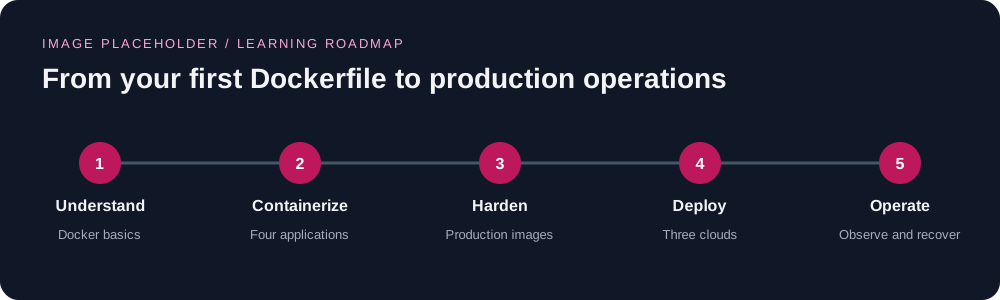
Choose your starting point
| Experience | Starting point | Milestone |
|---|---|---|
| Absolute beginner | Part I, followed by one application chapter | Explain the Dockerfile and run the application in a container |
| Application developer | Part II, then one cloud foundation and its application recipe | Deploy a working production image and inspect its logs |
| Experienced DevOps engineer | Production refactors, Part III, and Part V | Review identity, networking, secrets, rollout, and recovery |
| Senior platform engineer | All twelve recipes and the advanced chapters | Establish repeatable delivery and compare operating tradeoffs |
The four applications
| Application | Demonstration workload | Beginner baseline | Production evolution |
|---|---|---|---|
| Next.js | A web application with a page, API route, and health endpoint | A single-stage application image | Separate dependency, build, and non-root standalone runtime stages |
| Node.js | An HTTP API with health checks and graceful shutdown | A small Node.js runtime image | Separate dependency preparation and a minimal non-root runtime |
| NestJS | A TypeScript API with validation and health endpoints | A straightforward application build and start | Compile in a build stage and retain only runtime dependencies |
| .NET/C# | An ASP.NET Core API with health endpoints | A simple SDK-based container | Separate restore, build/publish, and non-root ASP.NET runtime stages |
SENIOR TIP — Define production through evidence
Image size alone is not the finish line. Each production chapter will verify the runtime user, included files, health behavior, shutdown handling, configuration, dependency provenance, and deployment recovery.
What every implementation chapter will deliver
- Prerequisites, installation links, version checks, and a tested version matrix.
- A complete project tree and every application/configuration file needed to run the example.
- A complete
Dockerfile.basic, followed immediately by the complete productionDockerfileand an explanation of the refactor. - A complete
.dockerignore,.gitignore, and safe.env.exampleappropriate to that application. - Reproducible dependency installation, lockfile generation/verification, and build commands.
- Complete local run commands, a Compose file where the example needs companion services, and expected verification output.
- Non-root permissions, slim or Alpine base-image decisions, caching, signals, probes, and runtime configuration.
- Complete cloud manifests, policies, deployment scripts, and cleanup commands when the corresponding cloud chapter is written.
Part I — Foundations for absolute beginners
1. What DevOps solves
- The path from source code to a running service.
- Why an application can work on one laptop and fail on another.
- Delivery, operations, ownership, and feedback loops.
- Containers, virtual machines, registries, and managed container platforms.
- Continuous integration, continuous delivery, and release approval.
- What this guide will build and how success will be checked.
2. Prepare the workstation and accounts
- Install Git, an editor, Docker Desktop or Docker Engine, and the required container tooling.
- Explain the Docker client, daemon, BuildKit, Buildx, and Docker Compose.
- Choose the command environment: Bash on Linux/macOS or WSL on Windows; identify shell-specific differences explicitly.
- Install
curlandjqand verify that example scripts can use them. - Install Node.js and the .NET SDK only when their application chapter requires them.
- Prepare AWS, Azure, and Google Cloud accounts, projects/subscriptions, and CLI installations.
- Authenticate without committing credentials to Git or adding them to an image.
- Choose regions, naming conventions, tags/labels, and separate lab environments.
- Configure cost visibility, billing alerts, and a cleanup checklist before creating cloud resources.
- Run the workstation readiness checks and troubleshoot installation failures.
3. Docker from the first command
- Images, containers, image layers, build context, tags, and digests.
- The lifecycle of
docker build,docker run,docker logs,docker exec, and container removal. - Explain
FROM,WORKDIR,COPY,RUN,ENV,EXPOSE,USER,ENTRYPOINT, andCMD. - Understand container networking, port publishing, and binding the application to a reachable interface.
- Separate build arguments, runtime environment variables, and secrets.
- Understand volumes, temporary files, and disposable container filesystems.
- Diagnose an exited container and inspect its effective configuration.
- Read a basic Dockerfile before changing it.
4. The common production image contract
- Why multi-stage builds separate build tools from runtime artifacts.
- Choose Alpine or slim bases according to runtime and native dependency compatibility.
- Pin supported versions, record image digests, and maintain an update process.
- Design build layers for dependency caching and introduce BuildKit cache mounts where appropriate.
- Explain why
.dockerignoreprotects the build context and speeds up builds; show what it cannot protect. - Prevent secret files, Git metadata, local dependency folders, and unnecessary artifacts from entering the build context.
- Create or use a non-root runtime user and verify ownership of required writable directories.
- Use exec-form startup commands, handle signals, and implement graceful shutdown.
- Define startup, liveness, and readiness checks according to the receiving platform.
- Emit useful logs to standard output/error and avoid local log files as the only record.
- Test read-only filesystem behavior and identify required temporary/cache paths.
- Build for the intended CPU architecture and inspect the resulting image.
Reference for the multi-stage design: Docker multi-stage builds.
Part II — Four application chapters: basic first, production immediately after
5. Next.js: containerize a full-stack web application
- Prerequisites: Docker, Git, the selected Node.js/npm versions, an editor, and
curl; verify every tool before scaffolding. - Why: Trace a page request, an API request, static assets, and the difference between development and production execution.
- Complete application: Write the project manifest, configuration, page, API route, health endpoint, and required TypeScript files.
- Beginner Dockerfile: Write
Dockerfile.basiccompletely and explain installation, building, port selection, and startup line by line. - Production refactor: Immediately introduce the full multi-stage Dockerfile, standalone output, artifact copying, non-root execution, and cache ownership.
- Complete supporting files: Write
.dockerignore,.env.example, and local run/Compose configuration. - Configuration: Identify browser-visible build-time values, server runtime values, and secrets; explain the implications for artifact promotion.
- Verification: Check page rendering, API responses, static assets, health checks, runtime identity, and termination.
- Senior concerns: Image optimization dependencies, caching/revalidation across replicas, writable paths, and reproducible builds.
- Troubleshooting: Missing assets, an incorrect start command, binding failures, and environment changes that require rebuilding.
- Cloud handoff: Record the image digest, port, probe path, configuration requirements, and all three deployment recipe links.
Framework reference: Next.js deployment documentation.
6. Node.js: containerize an HTTP API
- Prerequisites: Docker, Git, the selected Node.js/npm versions, and
curl; explain that Node.js is the runtime for this example. - Why: Trace an HTTP request through a small API and distinguish application code from the Node.js process.
- Complete application: Write the package manifest, server, health endpoints, input/error handling, and shutdown logic.
- Beginner Dockerfile: Write the full single-stage baseline and explain every instruction and local run command.
- Production refactor: Immediately show the complete staged dependency/runtime image with reproducible installation, caching, and non-root ownership.
- Complete supporting files: Write
.dockerignore,.env.example, and the local run/Compose configuration. - Configuration: Handle ports, runtime settings, secrets, request limits, and proxy-related settings.
- Verification: Test API responses, failure handling, health checks, effective user, and in-flight requests during shutdown.
- Senior concerns: Connection pooling, outbound timeouts, resource limits, native dependencies, and graceful termination budgets.
- Troubleshooting: Missing dependencies, incorrect network binding, process exit codes, and memory pressure.
- Cloud handoff: Record the deployable image, runtime contract, and AWS/Azure/GCP recipe links.
7. NestJS: compile TypeScript and run a lean API image
- Prerequisites: Docker, Git, the selected Node.js/npm versions, the scaffolding approach, and
curl. - Why: Explain modules, controllers, services, TypeScript compilation, and production startup in plain language.
- Complete application: Write the entry point, module, controller/service, validation configuration, health endpoints, and build configuration.
- Beginner Dockerfile: Write the full baseline and show how source becomes executable JavaScript.
- Production refactor: Immediately show the full dependency/build/runtime stages and exclude unnecessary compiler and development packages.
- Complete supporting files: Write
.dockerignore,.env.example, project configuration, and local run/Compose files. - Configuration: Validate runtime settings, define network binding, and expose platform-compatible health endpoints.
- Verification: Exercise validation errors, API routes, health checks, runtime dependencies, and shutdown hooks.
- Senior concerns: Worker topology, database connections, migrations, logging, and startup dependencies.
- Troubleshooting: Missing build output, entry-point mismatches, dependency injection errors, and failed readiness.
- Cloud handoff: Record the runtime contract and the three complete cloud recipe links.
Framework reference: NestJS deployment documentation.
8. .NET/C#: publish an ASP.NET Core API
- Prerequisites: Docker, Git, the selected supported .NET SDK, an editor, and
curl; verify the SDK and target runtime. - Why: Explain C# source, NuGet restore, compilation, publishing, and the distinction between SDK and runtime images.
- Complete application: Write the project file, API entry point, health endpoints, logging, and safe configuration files.
- Beginner Dockerfile: Write a complete SDK-based baseline and explain how it builds and starts the application.
- Production refactor: Immediately show complete restore/build/publish/runtime stages, dependency caching, non-root execution, and the final runtime image.
- Complete supporting files: Write
.dockerignore, safe environment examples, and local run/Compose configuration. - Configuration: Bind the HTTP listener, separate environment-specific settings and secrets, and handle forwarded headers appropriately.
- Verification: Test routes, probes, runtime ownership, published artifacts, configuration precedence, and graceful shutdown.
- Senior concerns: Globalization/native compatibility, trimming and AOT eligibility, runtime diagnostics, and database migration jobs.
- Troubleshooting: SDK/runtime mismatches, port configuration, missing assemblies, certificates, and platform-specific dependencies.
- Cloud handoff: Record the published image and its AWS/Azure/GCP runtime requirements.
Framework reference: Microsoft's .NET container tutorial.
Part III — Build the three cloud foundations
WARNING — Provisioning and cleanup belong together
Each cloud chapter will name the resources it creates, show how to verify them, and provide an ordered teardown. A resource is not considered cleaned up simply because the application stopped responding.
9. AWS foundation: ECR, ECS, and Fargate
- Prerequisites: AWS account, AWS CLI, Docker/Buildx, Bash,
jq,curl, and the required identity/permissions. - Explain ECR, ECS clusters/services/tasks, Fargate, task definitions, and the load-balancer request path.
- Authenticate, verify account/region, and establish consistent resource names and tags.
- Provision ECR with the selected tag/scanning policies; authenticate Docker and publish a versioned image.
- Provision an explicit VPC, subnets, routing, and security groups; distinguish the learning layout from the production layout.
- Create the execution role and application task role separately, with complete trust and permission documents.
- Configure logs, secret delivery, and access to required backing services.
- Provision the ECS cluster, Application Load Balancer, target group, listener, and service dependencies.
- Write the complete Fargate task definition and create the service with the correct network settings.
- Configure health checks, deployment failure handling, and service autoscaling.
- Add TLS/custom domains, verify deployment, read logs, and exercise rollback.
- Tear down service, load-balancer resources, networking, logs, images, and identities in dependency order.
Platform reference: Amazon ECS and Fargate.
10. Azure foundation: ACR and Container Apps
- Prerequisites: Azure subscription, Azure CLI and required extensions, Docker/Buildx, Bash,
jq, andcurl. - Explain resource groups, Azure Container Registry, Container Apps environments, applications, and revisions.
- Authenticate, verify the active subscription, register required providers, and choose region/names/tags.
- Provision the resource group, registry, logging resources, and Container Apps environment.
- Create the managed identities and scoped registry/application role assignments.
- Build, tag, and publish the image; configure identity-based image pulls.
- Write complete application configuration for ingress, target port, resources, probes, environment variables, and secrets.
- Deploy the first revision and verify the application URL and logs.
- Configure minimum/maximum replicas, scaling rules, and revision traffic behavior.
- Integrate secret management, network restrictions, and backing-service access.
- Add custom domains/TLS and demonstrate revision-based rollback and traffic changes.
- Delete lab resources and verify the intended resource group and registry cleanup.
Platform reference: Azure Container Apps overview.
11. GCP foundation: Artifact Registry and Cloud Run
- Prerequisites: Google Cloud project with billing, Google Cloud CLI, Docker/Buildx, Bash,
jq, andcurl. - Explain Artifact Registry repositories, Cloud Run services/revisions, service identities, and invocation permissions.
- Authenticate, verify the project/region, and enable required APIs explicitly.
- Provision Artifact Registry, authenticate Docker, and publish the selected image.
- Create separate deployment and runtime identities with scoped permissions.
- Define the container contract, listener port, startup behavior, resources, and probes.
- Configure secret delivery and backing-service connections without embedding credentials in the image.
- Write the complete service specification and deploy the first revision.
- Choose public or authenticated invocation deliberately and test the selected access model.
- Configure concurrency, request timeout, instance limits, and private network egress where required.
- Inspect logs, move revision traffic, verify TLS/domain setup, and demonstrate rollback.
- Delete services, registry artifacts, secret versions, and lab identities as appropriate to their ownership.
Platform reference: Cloud Run container runtime contract.
Part IV — Twelve complete application-to-cloud deployment recipes
The foundation chapters explain each platform. The recipes below provide the complete, runnable application-specific files and ordered commands. Shared concepts will not be used as a reason to omit prerequisite provisioning, configuration, validation, or cleanup steps.
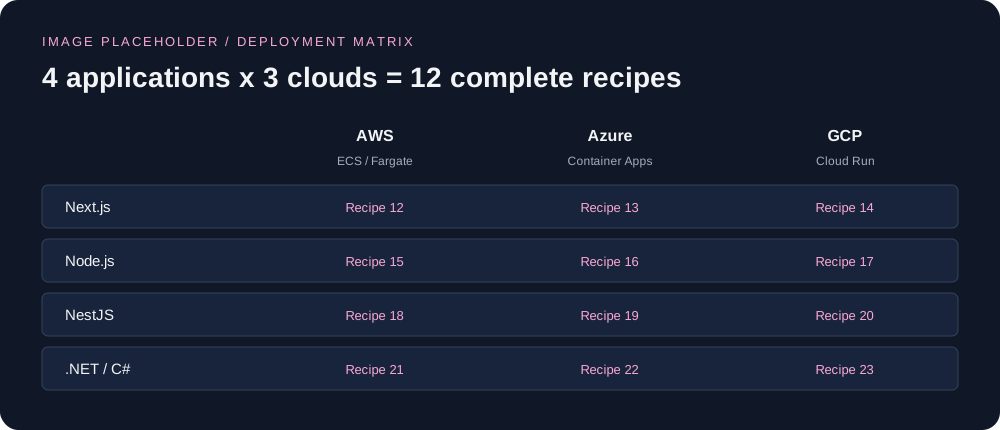
Next.js deployment recipes
- Next.js → AWS ECS/Fargate: Provision the complete AWS resources; publish the standalone image; configure port, health path, environment, secrets, and writable cache requirements; deploy behind the load balancer; test pages/assets/API routes; inspect logs; roll back; tear down.
- Next.js → Azure Container Apps: Provision the Azure resources and registry-pull identity; publish the image; write the full application specification; configure ingress, probes, environment, and replica behavior; verify rendering and API routes; inspect revisions; roll back; tear down.
- Next.js → GCP Cloud Run: Provision APIs, registry, and identities; publish the image; write the complete service specification; configure listener, probes, secrets, resources, and invocation policy; test pages/assets/API routes; move revision traffic; roll back; tear down.
Node.js deployment recipes
- Node.js → AWS ECS/Fargate: Provision the AWS resources; publish the API image; write the task definition, IAM documents, and deployment commands; configure networking, health checks, logs, and secrets; verify requests and shutdown; scale; roll back; tear down.
- Node.js → Azure Container Apps: Provision the Azure resources; publish and pull the API image using managed identity; configure ingress, API settings, probes, replicas, and logs; test successful/error responses; inspect revision health; roll back; tear down.
- Node.js → GCP Cloud Run: Provision the GCP resources and permissions; publish the API image; configure port, invocation access, concurrency, request timeout, and secrets; test requests and health behavior; inspect logs; roll back; tear down.
NestJS deployment recipes
- NestJS → AWS ECS/Fargate: Provision the AWS resources; publish the compiled API image; write complete task/service configuration; configure validated settings, probes, connections, and shutdown budgets; deploy; test routes and validation; roll back; tear down.
- NestJS → Azure Container Apps: Provision registry, environment, identity, and application; publish the compiled image; configure ingress, settings, secret references, probes, and scaling; inspect startup and validation behavior; manage revisions; roll back; tear down.
- NestJS → GCP Cloud Run: Provision project APIs, registry, and service identity; publish the compiled image; write full service configuration; align listener, probes, concurrency, runtime settings, and dependency access; test routes; roll back; tear down.
.NET/C# deployment recipes
- .NET/C# → AWS ECS/Fargate: Provision the AWS resources; publish the ASP.NET runtime image; write complete task and IAM configuration; configure HTTP binding, health paths, settings, secrets, and resource limits; test the API; inspect logs; roll back; tear down.
- .NET/C# → Azure Container Apps: Provision the Azure resources and managed identities; publish the image; write the complete Container Apps specification; configure target port, environment, secret access, probes, and replica limits; verify startup/API behavior; roll back; tear down.
- .NET/C# → GCP Cloud Run: Provision the GCP resources; publish the runtime image; write the full service specification; align the ASP.NET listener with the service port; configure invocation, identity, probes, resources, and secrets; verify requests; roll back; tear down.
Acceptance checks required by every recipe
- Confirm account/project/subscription and region before provisioning.
- Show the complete resource inventory and every prerequisite command.
- Identify the source commit, image tag, image digest, and deployment/revision identifier.
- Explain and verify the effective runtime identity and access model.
- Test the application externally and check platform health status and logs.
- Test a bad configuration or failed release and demonstrate a recovery path.
- Verify the restored release after rollback.
- Show ordered cleanup and verify that lab resources were removed.
Part V — Senior engineering and production operations
24. Secure the software supply chain
- Dependency/version updates, supported base images, vulnerability scanning, and policy exceptions.
- Software bills of materials, image provenance, signing, and digest-based promotion.
- Build-time secret mounts and checks for unintended files in image layers.
- Non-root execution, capability reduction, writable paths, and platform-specific restrictions.
- Authentication, authorization, secret rotation, and audit records.
25. Add backing services without breaking the deployment model
- Separate the web/API container from its database, cache, queue, and object storage.
- Use Compose for the local integration example and managed services for the cloud recipes.
- Provide complete optional service configuration and explain network access and credentials.
- Run database migrations as a controlled job rather than an uncoordinated action in every replica.
- Define pooling, timeouts, retry limits, backups, and restore verification.
- Store uploads and shared state outside disposable application containers.
26. Build complete CI/CD pipelines
- Write full workflows for application checks, image builds, scans, and artifact publication.
- Use appropriate federated identity for GitHub Actions to AWS, Azure, and GCP.
- Separate build permissions from deployment permissions and use protected release environments.
- Promote a tested artifact, while accounting for framework-specific build-time public configuration.
- Automate smoke tests, rollout verification, and failure reporting.
- Supply complete workflow files and explain every credential/permission boundary.
27. Make infrastructure repeatable
- Translate the CLI labs into complete infrastructure-as-code examples.
- Define environments, inputs, outputs, dependencies, state, and locking.
- Handle drift, imports, resource ownership, and destructive changes.
- Review changes before applying them and verify the resulting infrastructure.
- Explain which components are shared and which belong to a single application.
28. Observe, tune, and control resource usage
- Structured logs, request correlation, metrics, traces, and dashboards.
- Service indicators/objectives and alerts tied to user-visible failures.
- CPU/memory sizing, startup time, cold starts, request latency, and concurrency.
- Application autoscaling and the limits imposed by databases or external services.
- Record measured image sizes/build times and explain benchmark conditions.
- Monitor resource usage and verify scale-to-zero or idle behavior for the chosen platform configuration.
29. Release safely and recover deliberately
- Rolling, canary, and blue/green patterns with complete platform-specific examples.
- Readiness gates, failure detection, traffic changes, and automated rollback boundaries.
- Separate application rollback from database/schema recovery.
- Back up persistent state and test restore procedures.
- Write a complete incident runbook and perform a controlled failure drill.
Part VI — Troubleshooting, reference, and capstone
30. Diagnose failures from build context to public URL
- Dependency installation, cache invalidation, and architecture mismatches.
- Missing build artifacts, incorrect entry points, and file permissions.
- Listener/target-port mismatches, failed probes, and startup timing.
- Registry authentication, denied identity permissions, and missing secrets.
- DNS, TLS, ingress, egress, and backing-service connectivity.
- Revision/task startup failures, out-of-memory exits, and interrupted shutdown.
- A decision tree with the exact next inspection command and expected evidence.
31. Docker and cloud command reference
- Dockerfile instruction glossary and Docker/Buildx/Compose command reference.
- AWS/Azure/GCP service terminology mapped side by side.
- Runtime port, probe, identity, and secret configuration reference.
- Shell quoting, environment-variable syntax, and Windows/WSL notes.
- Complete repository file index and tested version/compatibility matrix.
32. Production review and cleanup checklists
- Application and image readiness checklist.
- Identity, networking, configuration, and secrets checklist.
- Logging, scaling, rollout, backup, and recovery checklist.
- Platform-specific resource inventory and teardown verification.
- Common learning shortcuts and the production changes needed before using them.
33. Capstone: deploy and defend your design
- Select one application and complete its deployments to all three clouds.
- Verify access control, probes, logs, configuration, and resource limits.
- Trigger a failed release and demonstrate a verified rollback.
- Compare the platforms using measured results and documented assumptions.
- Present the image, infrastructure, pipeline, runbook, and cleanup evidence for review.
INFO — Section-by-section writing order
Continue with Chapter 1, then the workstation and Docker foundations. Write each application's beginner Dockerfile and production refactor together, followed by the cloud foundations and all twelve recipes. End with the advanced operational chapters and capstone. Each implementation section will include its complete files and commands when it is written.